Private photo vault for iPhone and Android
Private photos that open with a pattern only you know.
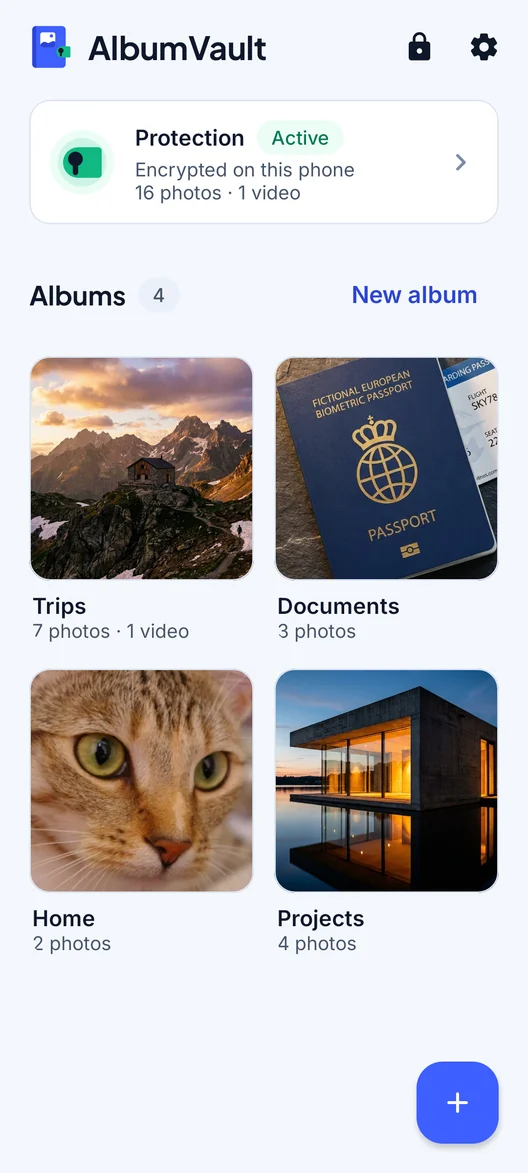
AlbumVault keeps private photos and videos encrypted on your phone. You open it by drawing a pattern. With Pro, a second pattern can open a separate vault, and nothing on the phone lists how many you have.

 Coming soon to both stores
 - No account, no email
- Free to start
- We never see your photos or your key
Draw your pattern
Connect at least 6 dots
Vault
Same pattern, same vault. In the app, a pattern that belongs to no vault opens nothing; this demo invents one so you can see the idea.
Live demo. It runs in this page and keeps nothing.
Why a vault
Your phone’s passcode opens everything. A vault adds a second lock that only you can open.
You hand your phone to someone
A friend scrolls one photo too far, a child plays a game, a colleague looks at a picture you showed them.
What to doYour phone goes in for repair
Some repair shops ask for your passcode to test the phone. Whatever the passcode opens, they can open.
What to doSomeone knows your passcode
A partner, a housemate or a thief who watched you type it. The phone is open to them; your vault is not.
What to doWhat it does
Built for the moment someone else is holding your phone
Pattern unlock
Draw a pattern on a 5×5 grid. Over 19 million 6-dot patterns, and far more with longer ones.
Separate vaultsPro
Each pattern leads to its own vault. No list and no count of your vaults is kept.
Guest vaultPro
A second pattern opens a separate vault with only what you put there.
Emergency patternPro
Forced to open the app? An emergency pattern opens your chosen vault and removes the others from the phone.
Encrypted backup
Save an encrypted backup file to Files, a computer or a drive you trust. Only your recovery phrase opens it.
Recovery phrase
A 12-word phrase per vault, shown once. We never see it, so nobody can reset it but you.
How it works
Three steps from install to locked
-
Draw your pattern
Unlock by drawing a pattern on a 5×5 grid of dots, using at least 6 dots. Prefer numbers? A PIN of 6 to 12 digits works too. Then write down your 12-word recovery phrase.
-
Move your photos in
When you import from your photo library, originals are deleted only after the encrypted copy is safely written, and only after you confirm.
-
Save an encrypted backup file
Save an encrypted backup file of a vault to Files, a computer or a drive you trust. Only its 12-word recovery phrase opens it.
Security, plainly
Standard building blocks, named in full
Your pattern or PIN is stretched with PBKDF2-HMAC-SHA512 (600,000 rounds) and combined with a key held in your phone’s Secure Enclave (iPhone) or StrongBox/TEE (Android), so it can only be tried on your phone. Files are encrypted in 1 MB pieces with AES-256-GCM; each file gets its own key, and every piece is checked so a changed or reordered piece is refused.
- AES-256-GCM
- PBKDF2-SHA512 · 600k rounds
- Secure Enclave · StrongBox
- 12-word recovery phrase
Free tools
Privacy tools that never upload your photos
They run in your browser. Load the page, switch on airplane mode, and they still work.
Photo metadata remover
See the location, device and dates hidden in a photo, then save a clean copy.
OpenFace blur
Cover faces, number plates and screens with blur, pixels or a solid block.
OpenImage compressor
Shrink a photo to 20, 50 or 100 KB for upload forms.
OpenUnlock strength calculator
Compare PINs, patterns and passphrases by how many guesses they would take.
OpenGuides
Straight answers about photo privacy
Forgot your photo vault password?
Whether you can get back in depends on how the app locks your files, and on the recovery option you set up in advance.
ReadPassword-protect a folder on iPhone
The Hidden album and locked apps open with your phone’s passcode. A locked note can have its own password, and a vault app adds a separate lock.
ReadHow to choose a photo vault app
This page ranks no apps. It gives eight checks that separate an encrypted vault from a hidden folder, and what eight options state.
ReadFAQ
Questions people ask
Is AlbumVault safe? Can it be hacked?
Every photo and video is encrypted on your phone before it is saved. Every pattern or PIN attempt goes through a key that stays in your phone’s security chip, so a copy of the vault files cannot be guessed at on another computer. No app can promise it cannot be hacked. AlbumVault cannot protect against malware or a jailbroken or rooted phone running code while the vault is open, against what is on screen or shared out once decrypted, or against someone deleting files they can reach (they can destroy data, not read it).
What happens if I forget my PIN or pattern?
You get back in with the vault’s recovery phrase. Each vault has its own 12-word recovery phrase (BIP-39), shown once. We never see it and cannot reset it. If you forget your pattern, the phrase gets you back in.
Do photos in AlbumVault go to iCloud?
No. Vault files are left out of your phone’s own iCloud or Google device backup. Backing up a vault is a separate, encrypted step you control. Save an encrypted backup file of a vault to Files, a computer or a drive you trust. Only its 12-word recovery phrase opens it. Originals you keep in your photo library still sync with iCloud Photos as usual.
Can someone tell I have a hidden vault?
AlbumVault keeps no list and no count of your vaults, and each vault’s files look alike. AlbumVault does not hide that some private data exists: your phone’s storage settings, and a forensic examiner, can still show that. Deleting is not shredding: a lab that images the phone may recover deleted bytes. Use AlbumVault to keep people out of your photos, not to beat a forensics lab.
Does AlbumVault work on Android?
Yes. AlbumVault is built for iPhone and Android. Move a vault between them with an encrypted transfer file and its recovery phrase.
Is AlbumVault free?
Yes, AlbumVault is free to start. Free: 1 vault, up to 100 photos and 10 videos, encrypted backup file included. Pro: as many vaults as you want, including the guest vault, with no limit on photos and videos. Pro also adds break-in photos and icon disguise.
Do I need an account?
No. There is no AlbumVault server, so there is no AlbumVault account to sign up for. We never have your photos or your keys, so we have nothing to hand over.
What happens if I lose my phone?
Your photos come back only from a backup file you saved. Save an encrypted backup file of a vault to Files, a computer or a drive you trust. Only its 12-word recovery phrase opens it. On the new phone, restore before you set up a vault there: on the welcome screen, tap I have a backup file (on Android, Restore from a backup), pick the file and type the vault’s 12-word recovery phrase.
AlbumVault for iPhone and Android
Your photos, your pattern, your phone
- Encrypted on this phone
- Each pattern leads to one vault
- No account needed
Coming soon to both stores